




Qarhami

Insurance for Turo hosts & rental fleetsYour insurer, connected to the car's own record.

Share a car's telematics with ABI or Tint straight from its vehicle record: one checkbox per insurer, car by car, with no second tracker to install. Need a policy for your rental fleet? Green Atlas Insurance can compare quotes for you.

Works with
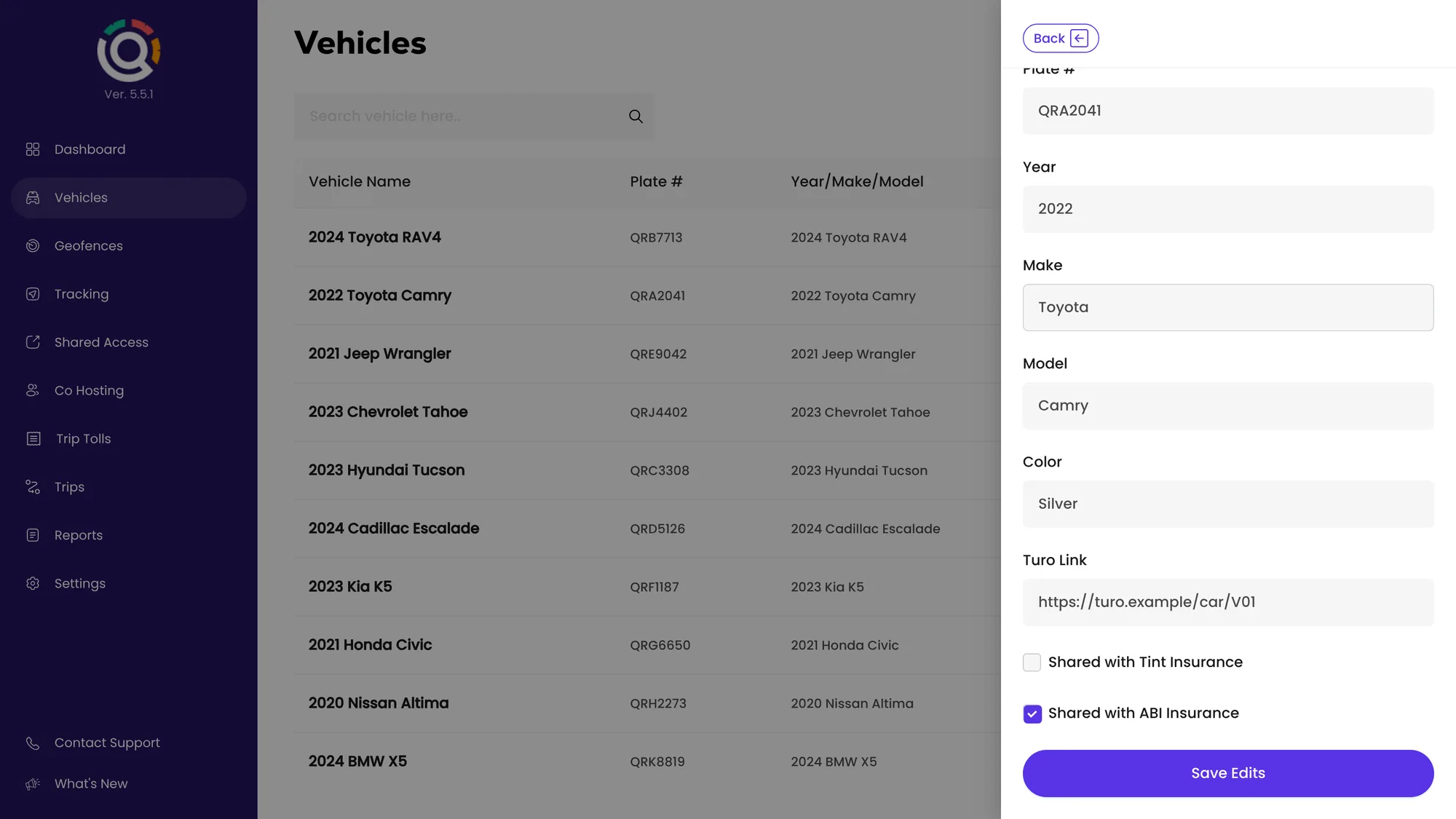
The vehicle edit form in the Qarhami app with Shared with ABI Insurance ticked, Shared with Tint Insurance unticked and the Save Edits button
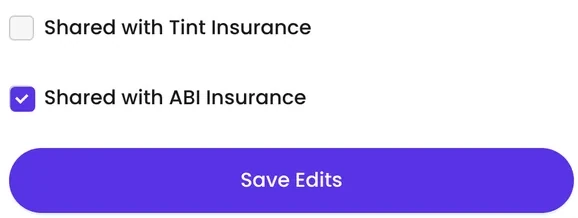
The two insurer checkboxes on a Qarhami vehicle record: Shared with Tint Insurance and Shared with ABI Insurance

Insurance partners

Approved & integrated with

Two insurers work directly with the record your Qarhami devices already keep. You choose which cars take part.

Integrated · technical partnership

Faster rental verification. Better-evidenced claims.

Turn on sharing for a car and American Business Insurance Services (ABI) receives that car's telematics record, to support rental verification and claims. Sharing is off by default and turned on car by car. No pricing, discount or endorsement is implied.

How the ABI integration works

Approved GPS provider for Off-Trip Insurance

Connect a car to Tint in two steps.

Qarhami is on Tint's list of approved GPS providers for Off-Trip Insurance. Tick the box on the car's record in Qarhami, then connect the car in your Tint portal within Tint's 60-day window. New cars start with Tint sharing ticked.

How to connect a car to Tint
On what is shared. The data an insurer receives, and how it uses it, are set by the insurer's program and your agreement with them. Qarhami keeps each vehicle's operating record and passes it on for the cars you enable; it does not decide your cover or your price. Qarhami is not an insurance agency, broker or carrier.

Telematics data sharing

One form. One checkbox per insurer.

The setting lives on the vehicle record, beside the plate and the VIN, so it stays with the car rather than with whoever set it.

1

Open the vehicle

Vehicles → View Vehicle → Vehicle Details → Edit. Check that the VIN matches the car on the policy.

2

Tick the insurer's box

At the bottom of the form: Shared with ABI Insurance and Shared with Tint Insurance. Each box controls one insurer on its own.

3

Save Edits

The app confirms with Vehicle updated successfully. Repeat for each car, then finish on the insurer's side if they ask for consent.

Kailie Green of Green Atlas Insurance
Kailie GreenGreen Atlas Insurance
AI-assisted campaign portrait

Need a policy?

Compare quotes with Green Atlas Insurance.

Kailie Green of Green Atlas Insurance is a licensed insurance agent who focuses on car rental and car-sharing insurance. As an independent agency, Green Atlas can request quotes from more than one insurer, so you can compare options for your fleet, whether you host on Turo, run private rentals or both.

  • Rental-focused. Turo, car-sharing and private rentals.
  • More than one insurer. Quotes you can compare side by side.
  • Beyond the fleet. Ask about personal auto, home, umbrella or other business cover.

Green Atlas Insurance is an independent agency and a Qarhami partner resource. Qarhami is not an insurance agency, broker or carrier and does not share your fleet data with Green Atlas. Availability, eligibility and pricing depend on the insurer and your state.

Questions

Insurance and data sharing, in plain terms.

How do I share my car's data with my insurer?

Open the car's record in the Qarhami app and tick the insurer's checkbox.

Go to Vehicles → View Vehicle → Vehicle Details → Edit, tick Shared with ABI Insurance or Shared with Tint Insurance, and press Save Edits. Each car keeps its own setting, and your insurer may ask you to confirm consent on their side, as Tint does in its portal.

Which insurers can receive data from Qarhami?

Two: American Business Insurance Services (ABI) and Tint.

Qarhami has a technical integration and partnership with ABI, and Qarhami is on Tint's list of approved GPS providers for Off-Trip Insurance. Each insurer has its own checkbox on the vehicle record, so you can share a car with one, both or neither.

Do I need a second tracker for my insurer?

No.

The Qarhami Track or Qarhami OBD already in the car keeps the record your insurer receives, so there is nothing extra to install. Sharing is a setting on the vehicle record, not a separate device, and you can turn it off for any car whenever you need to.

Is insurance data sharing on by default?

ABI sharing is off until you turn it on for a car.

Tint sharing is ticked when you add a car in Qarhami, so it is worth checking older records. You can change either setting at any time from the same vehicle form, and the change applies to that car only.

Can Qarhami help me find insurance for my rental fleet?

Yes, through Green Atlas Insurance.

Kailie Green of Green Atlas is a licensed insurance agent who focuses on car rental and car-sharing insurance, and as an independent agency Green Atlas can request quotes from more than one insurer. You start your inquiry directly with Green Atlas; Qarhami does not share your fleet data with the agency.

Does Qarhami sell insurance or set my price?

No.

Qarhami is not an insurance agency, broker or carrier and gives no insurance advice. Plans, pricing, eligibility and claim outcomes are decided by the insurer and your policy. Qarhami keeps each vehicle's operating record and passes it on only for the cars and insurers you enable.

Already on Qarhami? Turn on sharing tonight.

New to Qarhami? Start with a device, add the car, and the insurer's checkbox is waiting on its record.