


On this page
Turo lets a host invite co-hosts into a hosting team and choose which vehicles they can work on. Co-hosts get trip management by default and, if you allow it, pricing and availability. They can't file claims or see your earnings. Turo's pages don't cover how a co-host is paid or what they owe you, so put that in a written agreement.
What can a co-host do on Turo?
Turo gives you two levers. You pick the vehicles a hosting team can touch, and you pick which of two permission sets they get. You can't hand out single permissions from inside a set. In Turo's words, co-hosts either have access to the entire set or not at all.
You can remove permissions at any time. That matters more than it sounds, and we'll come back to it under ending the arrangement.
| Permission set | How it's granted | What it covers |
|---|---|---|
| Trip management | Default, assigned automatically | Add photos, run check-in and checkout in the app, message guests, respond to booking and trip change requests, propose a replacement vehicle, submit invoices for incidental costs, contact support, view trips and trip history. |
| Pricing and availability | Optional | Manage pricing, discounts, vehicle availability and the calendar. |
| Not available to co-hosts | Never | File claims, schedule messages, view vehicle or host settings, view trip receipts, host earnings or host tax information. |
How do you add a co-host?
- They need their own Turo account.No shared logins. If they don't have one, the invitation walks them through creating it and getting verified: profile photo, phone number, driver's license.
- Invite them by email.The email on the invitation has to match the email on their Turo account, or you'll be sending it again.
- They have 30 days.Invitations stay open for 30 days to accept or decline.
- Choose vehicles and permission sets.Start narrow. It's easier to add a car than to explain why you took one away.
- Agree who does the once-only actions.Accepting a booking, answering a trip change, submitting an incidental invoice, rating a trip: once one of you has done it, the other can't. Decide whose job each one is.
Guests see your co-host's name when the co-host sends or replies to a message, and co-hosts' names and photos appear on the trip's Details page. Tell guests who they'll be dealing with.
What should a co-host agreement cover?
Turo's permissions answer one question: what can this person do in the app? They don't say what the person is paid, what they're responsible for, or what happens when it ends. Those are the eight things to put in writing.
- Scope.Which cars, which tasks, which hours. "Help with the fleet" is how arguments start.
- Pay.Per trip, a percentage or a monthly figure. Define what counts as a trip, and the day payment is made.
- Costs that aren't pay.Fuel, cleaning supplies, parking, tolls. Who fronts the money, and what receipt gets it back.
- The once-only actions.Who accepts bookings, who sends incidental invoices and by when, who rates the trip.
- Keys and access.Which keys, lockbox codes and apps they hold. No shared passwords, ever.
- Standards.Cleaning level, photo set at handover and return, how fast a guest message is answered.
- When something goes wrong.Damage, tickets, a late guest. How fast they tell you, and what they send. Claims are yours to file, so you need the evidence the same day.
- Ending it.Notice period, return of keys, and access removed the same day.
Co-host agreement between [host] and [co-host], from [date]. 1. Scope: [vehicles], [tasks], [hours]. 2. Pay: [amount] per [trip / month / % of trip price], paid on [day]. A trip means [definition]. 3. Costs: [fuel, cleaning, parking, tolls] are paid by [who] and repaid within [days] with a receipt. 4. In the Turo app: bookings are accepted by [who]; incidental invoices are sent by [who] within [hours] of checkout; trips are rated by [who]. 5. Access: [keys, lockbox codes, apps]. No passwords are shared. 6. Standards: [cleaning], [photos at handover and return], guest messages answered within [minutes]. 7. Incidents: the co-host reports damage, tickets and late returns to the host within [hours], with photos. The host files any claim. 8. Ending: either side may end this with [days] notice. Keys are returned and access is removed the same day.
This outline is a starting point, not legal advice. Pay terms and whether a co-host is a contractor or an employee depend on where you operate, so have a lawyer in your state review the final document. Ask your insurer, too, what covers the car while a co-host is driving it between trips.
Where do co-host setups go wrong?
- A shared login. It feels quicker than an invitation. It also means you can't tell who did what, and you can't remove one person without changing everything.
- Pay agreed in a text thread. Fine for a month. Then a trip gets cancelled, or runs long, and nobody agrees what it was worth.
- Both of you assumed the other sent the invoice. Additional distance has a 72-hour window. It doesn't wait for you to compare notes.
- Access that outlives the arrangement. The co-host moved on in March and still knows every lockbox code.
What does this mean at your stage?
A co-host means something different when it's a friend helping on weekends than when it's a team across three airports. Find yourself below.
Learn the job before you hand it over.
With one or two cars you probably don't need a co-host yet, and running every trip yourself is how you learn what to delegate. Starting on Turo teaches the workflow. If a friend covers for you now and then, still write the one page.
Your first co-host gets trip management only.
Give them a few cars and the default set. Keep pricing with you until you've seen a month of their work. Decide the once-only actions on day one.
Split by zone, and audit access monthly.
At this size you'll have several co-hosts. Assign cars by location, give pricing to one person at most, and once a month check who still has access to what, in every app and every lockbox.
No platform sets the permissions for you.
On direct rentals there's no hosting team feature to lean on. The agreement carries everything, and the tools you use have to separate what a helper can do from what you can.
Give them the car. Keep the keys to the business.
Qarhami is a trip-aware rental fleet operating system for Turo hosts and private rental operators. Co-Hosting in Qarhami works the same way your agreement should: by vehicle, and by task.

You invite a co-host by email, choose the vehicles and set seven switches for each one, from lock and unlock to whether they can see trip earnings. Anything you leave off doesn't appear on their side. A co-host has their own login. A guest doesn't need one: that's what a Shared Access link is for.
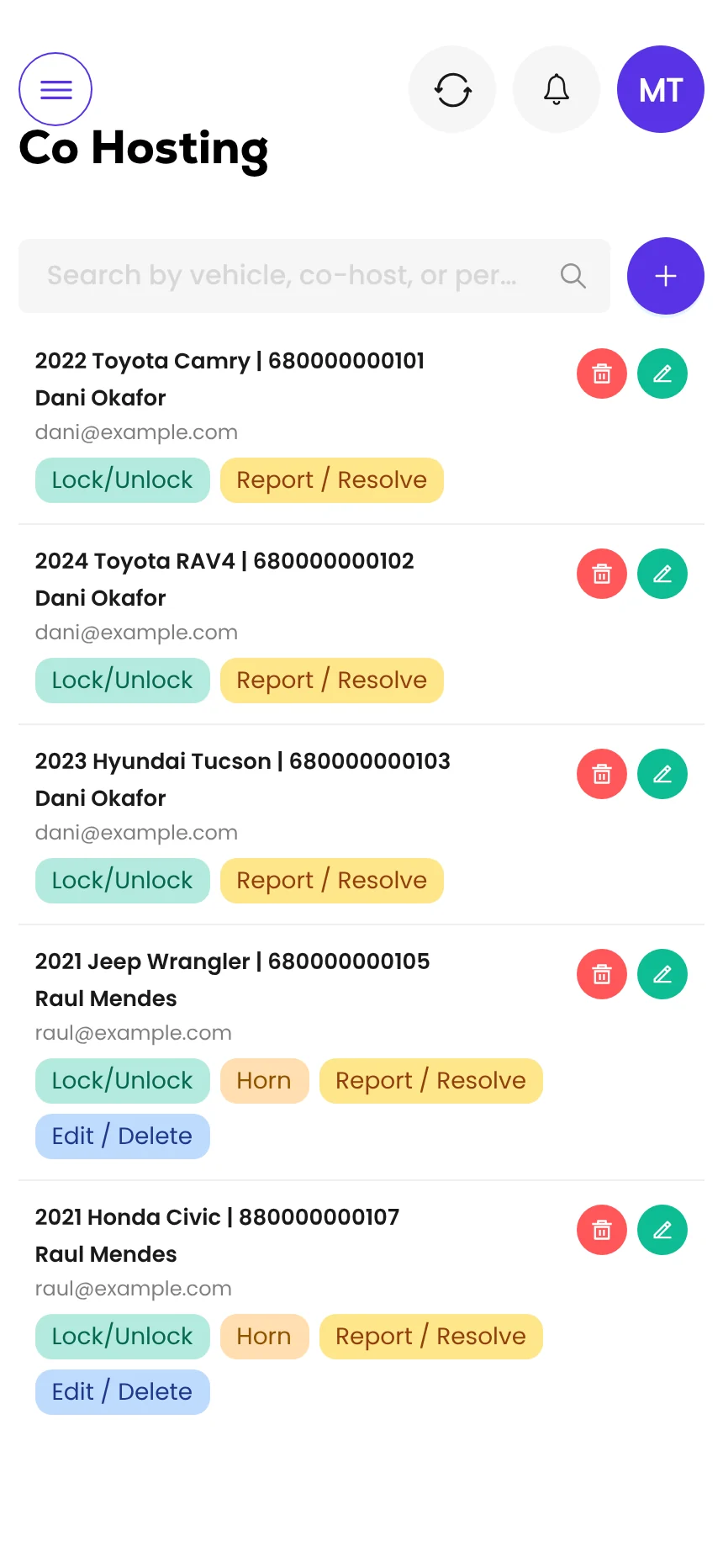
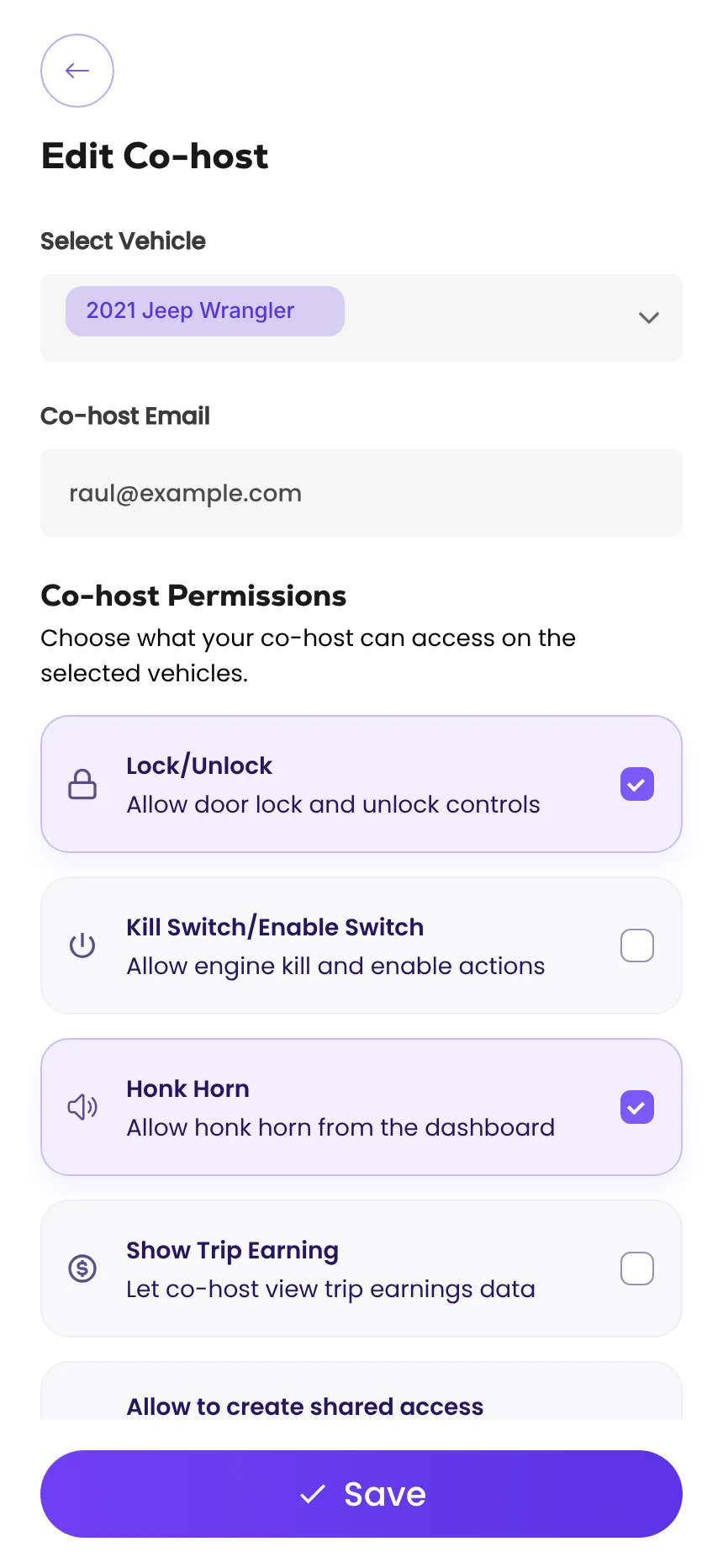
Screens from the Qarhami app running on demo data. Vehicles, guests and plates are fictional.
What changed since the last review?
- First published, from Turo's co-host page as updated 28 April 2026 and its hosting team permissions page.
Frequently asked questions
Does Turo allow co-hosts?
Yes. A host can invite co-hosts to join a hosting team and choose which vehicles the team can access. A co-host must have their own Turo account and be verified.
What can a co-host do on Turo?
By default a co-host gets trip management: adding photos, running check-in and checkout in the app, messaging guests, responding to booking and trip change requests, submitting invoices for incidental costs and contacting support. A host can also grant pricing and availability, which covers pricing, discounts, availability and the calendar.
Can a co-host see my Turo earnings?
No. Turo says co-hosts won't have permission to view trip receipts, host earnings or host tax information. They also can't view vehicle or host settings.
Can a co-host file a claim?
No. Turo's permissions page says co-hosts can't file claims or schedule messages. A claim has to come from the host.
How do I pay a Turo co-host?
Turo's co-host pages don't describe paying co-hosts, so the arrangement is between you and your co-host. Write down the rate, what counts as a trip, when payment is made and who covers costs such as fuel and cleaning.
Do I need a written co-host agreement?
Turo's co-host pages don't mention one. We recommend it anyway, because Turo's permissions only decide what a co-host can do in the app. Pay, duties, access to keys and what happens when you part ways are not covered. Have a lawyer in your state review the final document.
What should you do this week?
- List who currently has a key, a code or a login for each car. Include people who no longer help.
- If anyone uses your Turo login, replace it with a co-host invitation this week.
- Copy the outline, fill in the brackets and send it to your co-host to mark up.
- Agree who sends incidental invoices, and put the 72-hour window in the agreement.
- Set a monthly reminder to review access.
Sources
- Turo: Permissions for hosting teams · read 12 Nov 2026
- Turo: Becoming a co-host · updated 28 Apr 2026 · read 12 Nov 2026
- Turo: Creating a hosting team · read 12 Nov 2026

Rental Operator Circle editorial. Rental Operator Circle is the operator-led publication for Turo hosts and private rental operators, powered by Qarhami. Policy guides are checked against the platform's own pages, dated, and reviewed by a working operator before they publish.
This guide explains platform policy. It is not legal advice. Spotted something out of date? Tell us at support@qarhami.com and we'll re-check it.